B-3
User
Guide
for
the
Cisco
Application
Networking
Manager
5.2
OL-26572-01
Appendix
B
Using
t
he
ANM
Plug-In
With
Virtual
Data
Centers
Information
About
the
Cisco
ACE
SLB
Tab
in
vSphere
Client
Note
In
addition
to
ACE
devices,
the
Cisco
ACE
SLB
tab
also
displays
services
on
the
Content
Services
Switch
(CSS)
and
real
servers
on
t
he
Cisco
Content
Switching
Module
(CSM)
devices
associated
with
a
virtual
machine.
For
these
device
types,
from
the
Cisco
ACE
SLB
tab,
you
can
activate
or
suspend
the
services
or
real
servers
but
you
cannot
add
or
delete
these
items.
For
information
about
how
ANM
maps
real
servers
to
VMware
virtual
machines,
see
the
“Mapping
Real
Servers
to
VMware
Virtual
Machines”
section
on
page
5-68
.
For
more
information
about
the
Cisco
ACE
SLB
tab,
see
the
“Information
About
the
Cisco
ACE
SLB
Tab
in
vSphere
Cl
ient”
section
on
pa
ge
B-3
and
“Using
the
Cisco
ACE
SLB
Tab”
section
on
pa
ge
B-8
.
Information
About
the
Cisco
ACE
SLB
Tab
in
vSphere
Client
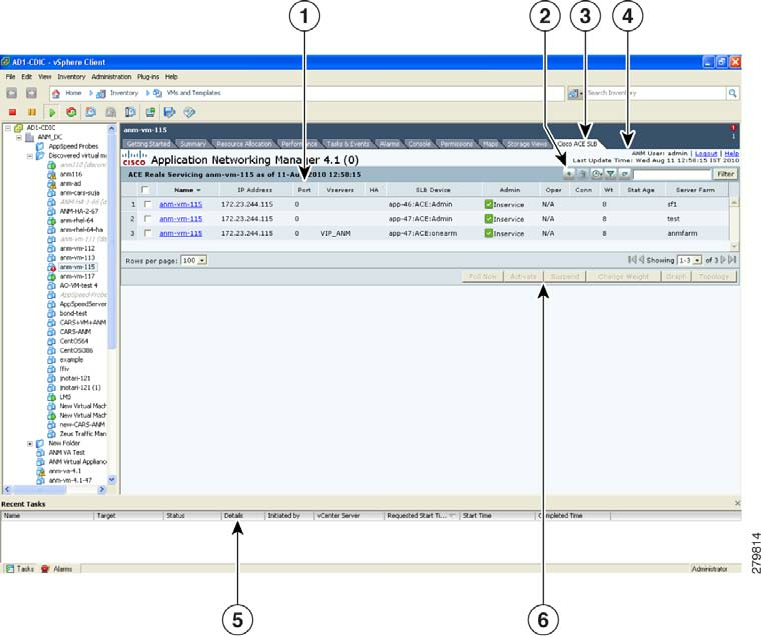
This
section
describes
the
components
of
t
he
Cisco
ACE
SLB
tab
that
display
in
vSphere
Client
when
you
choose
a
VM
from
the
VM
tree
(see
Figure
B-2
).
Figure
B-2
Cisco
ACE
SLB
Tab
in
vSphere
Client
Ta
b
l
e
B-1
describes
the
callouts
in
Figure
B-2
.