19-8
User
Guide
for
the
Cisco
Application
Networking
Manager
5.2
OL-26572-01
Chapte
r
19
Using
ANM
Mobile
Using
ANM
Mobile
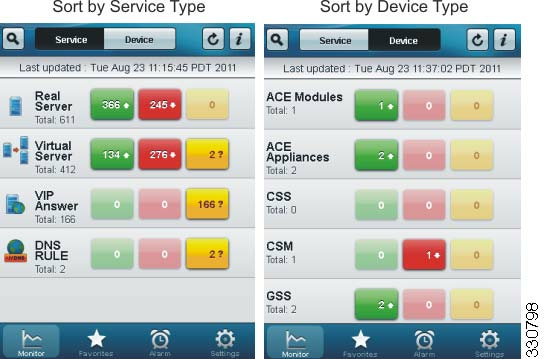
Figure
19-2
ANM
Mobile
Monitor
Windows:
Service
Type
and
Device
Type
Each
object
type
includes
three
color-coded
status
function
buttons
that
list
the
number
of
object
types
in
each
of
the
following
operational
states:
•
Up
(green)—Objects
in
service.
•
Down
(red)—Objects
out
of
service.
•
Unknown
(yellow)—Object
operating
state
cannot
be
determined
by
ANM.
The
status
function
buttons
allow
you
to
display
only
the
objects
of
the
specified
object
type
and
operating
st
ate.
Ta
b
l
e
19-3
lists
the
details
that
you
can
view
for
each
object
type
when
you
set
the
monitor
display
to
Service.
Ta
b
l
e
19-3
Managed
Object
Details
Object
Type
Attribute
Vi
r
t
u
a
l
S
e
r
v
e
r
Name
Policy
Map
IP
address,
protocol,
and
port
number
Device
Admin
status
Operating
status
Server
Farm
Current
Connections
Connections
per
second
Dropped
Connections
per
second
Dynamic
Workload
Scaling
(DWS)
Stat
Age