19-3
User
Guide
for
the
Cisco
Application
Networking
Manager
5.2
OL-26572-01
Chapte
r
19
Using
ANM
Mobile
Information
About
ANM
Mobile
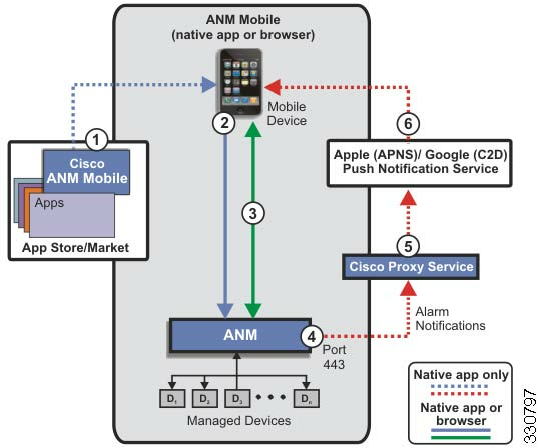
Figure
19-1
ANM
Mobile
Overview
The
components
in
Figure
19-1
are
as
follows:
1.
ANM
Mobile
app—Obtain
the
no-cost
Cisco
ANM
Mobile
app
from
the
app
store
or
market
associated
with
th
e
mo
bile
device.
2.
Mobile
device
login—Enter
ANM
IP
address,
username,
and
password
to
log
in
to
ANM
server
or
ANM
Virtual
Appliance
from
the
mobile
device.
After
a
successful
login,
ANM
associates
the
mobile
device
with
the
user
(see
the
“Displaying
a
Li
st
of
Users”
section
on
page
18-18
).
3.
Access
ANM—Access
ANM
functionality
to
monitor
your
network
and
perform
operational
tasks.
For
more
information,
see
the
“Using
ANM
Mobile”
section
on
page
19-5
.
4.
Alarm
Notifications—ANM
sends
alarm
notifications
to
a
mobile
device
(native
app
required)
through
a
proxy
service.
For
more
information,
see
the
“Setting
Up
and
Viewing
Mobile
Device
Alarm
Notifications”
section
on
page
19-13
.
5.
Cisco
Proxy
Service—Standalone
server
(managed
by
Cisco
IT)
that
forwards
notification
messages
from
ANM
to
the
Apple
or
Google
Push
Notification
Service.
The
proxy
service,
which
is
hosted
by
Cisco
and
used
for
alarm
notifications,
manages
the
push
notification
messages
that
ANM
issues
by
forwarding
them
to
the
Apple
or
Android
Push
Notification
Services.
For
more
information,
see
the
“Configuring
ANM
with
a
Pro
xy
Ser
ver
for
ANM
Mobile
Push
Notifications”
section
on
page
18-67
.
6.
Push
notification
service—Allows
a
third-party
server,
such
as
the
ANM
server,
to
send
notification
messages
securely
to
a
mobile
device.
The
push
notification
services
provided
by
APPLE
and
Google
are
used
for
alarm
notifications
and
are
best
effort;
therefore,
the
push
notification
service
provided
by
Cisco
is
also
best-effort.