18-45
User
Guide

for

the

Cisco

Application

Networking

Manager

5.2
OL-26572-01
Chapter
18


Administering

the

Cisco

Application

Networking

Manager
Using
an

AAA

Server

for

Remote

User

Authentication

and

Authorization
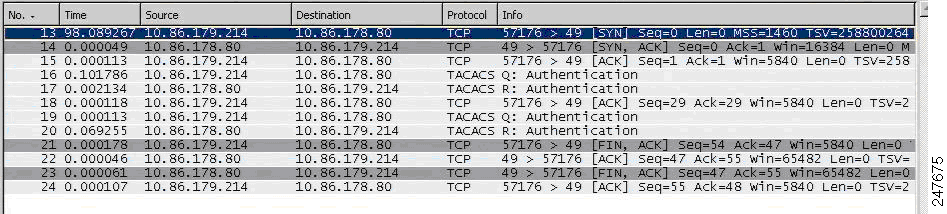
Figure
18-3
Example
of

Authentication

Communication

Between

ANM

and

a

TACACS+

Server
Related
Topics


Controlling
Access
to
Cisco
ANM,
page
18-3


How
ANM

Handles

Role-Based

Access

Control,

page
18-8


Configuring
Remote

User

Authorization

Using
a
TACACS+
Server,

page
18-45
Configuring
Remote

User

Authorization

Using

a

TACACS+

Server
You
can

configure

a

TACACS+

server

to

perform

remote

authorization

of

ANM

users

by

configuring

the
authorization
settings

on

the

AAA

server,

which

includes

a

unique

ANM

identifier,

user

role,

and

domain
information.
After

you

configure

the

TACACS+

server

and

ANM

for

remote

authorization,

when

ANM
authorizes
a

user,

it

sends

an

authorization

request

to

the

TACACS+

server,

which

returns

with

the

names
of
the

role

and

domains

that

are

assigned

to

t

he

user

and

defined

on

ANM.
Guidelines
and

Restrictions
This
topic

includes

the

following

guidelines

and

restrictions:


You
can
configure
ANM

remote

authorization
on
a

TACACS+

server

only.

This

feature

is

not
available
for

AD/LDAPS

or

RADIUS.


Cisco
has

approved
the

use

of


Cisco

Secure

Access

Control

System

(ACS)

only

for

remote
authorization
(Cisco

has

not

approved

the

use

of

other

TACACS+

servers

for

this

purpose).

The
Cisco
Secure

ACS

can

accept

an

authorization

request

and

send

the

following

attribute

in

the
request:
Step
10
Log
in

to

ANM

using

the
newly
created
account
To
test

the

new

login
credentials
for
user
authentication,
do
the

following:
a.
Log
in

to

ANM

by

entering

the

new

user

account

in

the

ANM

login

window.
Enter
the

username

using

the

following

format:
<username>@<organization>.
b.
Click
Login.
Authentication

occurs

between

ANM

and

the

TACACS+
server
(see

Figure

18-3 ).

All

authentication

transactions

are

performed

by
the
TACACS+

authentication

service

associated

with

the

associated
organization.
c.
ANM
appears
with
the

virtual

contexts

that

you
included

as

part

of

the
domain
for

the

RBAC

user

in

Step

3

(the

Create

an

domain

for

a

RBAC

user
task).
Table
18-11
Authenticating
ANM

Users

with

a

TACACS+

Server

(continued)
Task
Procedure