18-28
User
Guide
for
the
Cisco
Application
Networking
Manager
5.2
OL-26572-01
Chapte
r
18
Administering
the
Cisco
Application
Networking
Manager
Managing
User
Roles
The
Users
With
Rol
e
window
appears.
From
this
window
you
can
delete
or
du
plicate
a
use
r.
For
information
about
how
roles
map
to
users,
see
the
“Displaying
User
Roles
an
d
Associated
Tasks
an
d
ANM
Menu
Privileges”
section
on
pa
ge
18-28
.
Related
Topics
•
Duplicating
a
User
Account,
page
18-20
•
Managing
User
Roles,
page
18-25
Displaying
User
Roles
and
Associated
Tasks
and
ANM
Menu
Privileges
Note
Your
user
role
det
ermines
whether
you
can
use
this
option.
You
can
view
the
list
of
predefined
and
user
defined
roles
and
see
how
each
role
is
configured
to
manage
what
a
user
can
do
within
ANM.
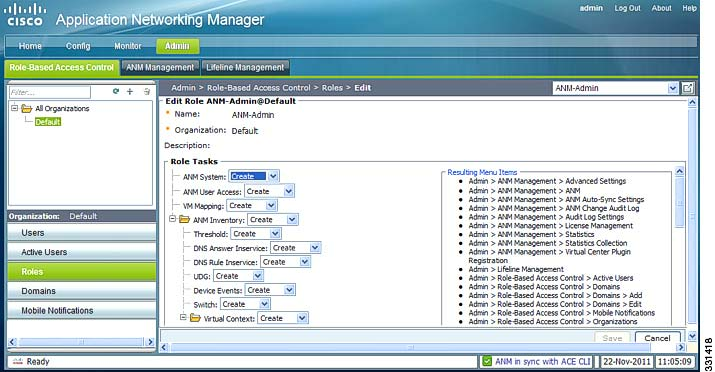
Figure
18-2
shows
a
sample
of
the
role
information
available
for
the
predefined
ANM-Admin
role.
Each
Role
Task
is
assigned
a
privilege
level
(No
Access,
View,
Modify,
Debug,
or
Create)
that
determines
what
displays
in
the
Resulting
Menu
Items
list
on
the
right.
This
list
indicates
which
ANM
GUI
items
the
role
allows
a
user
to
access.
Figure
18-2
Edit
Role
Window
Procedure
Step
1
Choosing
Admin
>
Role-Based
Access
Control
>
Organizations
>
Roles
.
The
Roles
table
appears,
displaying
the
list
of
predefined
and
user
defined
roles.
The
table
includes
the
available
role
tasks
and
associated
privilege
level:
No
Access,
View,
Modify,
Debug,
or
Create.
Step
2
To
view
the
ANM
menu
items
available
to
a
specific
user
role,
choose
a
user
role
and
click
the
Edit
icon.