17-69
User
Guide

for

the

Cisco

Application

Networking

Manager

5.2
OL-26572-01
Chapter
17


Monitoring

Your

Network
Displaying
Network

Topology

Maps
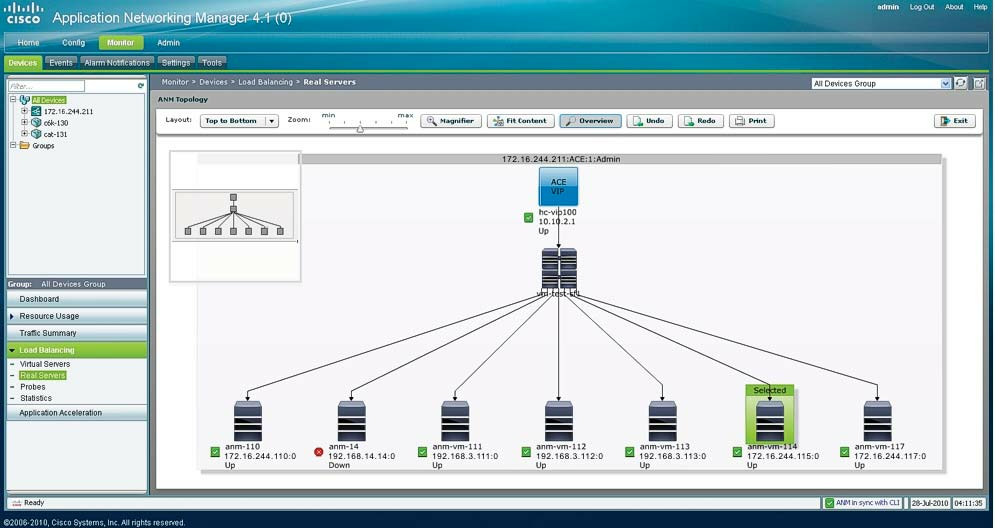
Figure
17-13
Sample
ANM

Topology

Map
Ta
b

l

e


17-25

describes

the

callouts

shown

in

Figure

17-13 .
3
3a
3b
1

2
Ta
b

l

e


17-25
Network
Topology

Map

Components
Item
Description
1
Topology
map

tool

bar

that

contains

the

following

tools:


Layout—Changes
the

direction

in

which

the

network

map

appears.

Choose

one

of

the

following

options

from

the
drop-down
list:

Top

to

Bottom

or

Left

to

Right.


Zoom—Modifies
the

size

of

the

network
map.
Click

and

drag

the

slide
bar
pointer

to

adjust
the
map

size.


Magnifier—Toggle
button
that
enables

or

disables

the
magnifier

tool.
When
enabled,

moving

your

mouse

over
the
the
t

opology

map

magnifies

the

area

t

hat

t

he

mouse

is

over.


Fit
Content—Fits

the

topology
map
to

the

window.


Overview—Toggle
button

that

enables

or

disables

the

Overview

Window

tool

(see

Callout

3).


Undo—Sets
the
network

node

icons

back

to

their
previous
positions.


Redo—Redoes
t

he

changes

that

you

made

before

you

clicked

Undo.


Print—Sends
the
topology
map

to

the

network
printer.


Exit—Closes
the
topology

map

and

returns

to

the

previous

window.