17-22
User
Guide

for

the

Cisco

Application

Networking

Manager

5.2
OL-26572-01
Chapter
17


Monitoring

Your

Network
Using
Dashboards

to

Monitor

Devices

and

Virtual

Contexts
Figure
17-10
Latest
5

Critical

Events

Table
The
following

details

are

shown

in

the

Critical

Events

table:


Device/Context—ACE
device

name
and
virtual

context

where

the

event
occurred.


Time—ANM
timestamp
at
which
the

alarm

occurred.


Type—Displays
if

the

event

appears
in
a

syslog
or
a
trap.


Details—Additional
information

about

the

critical

event.
A
hyperlink

allow

you

to

view

all

events

collected

by

ANM

(see

the

“Monitoring

Events”

section

on
page
17-55 ).
Contexts
Performance

Overview

Graph
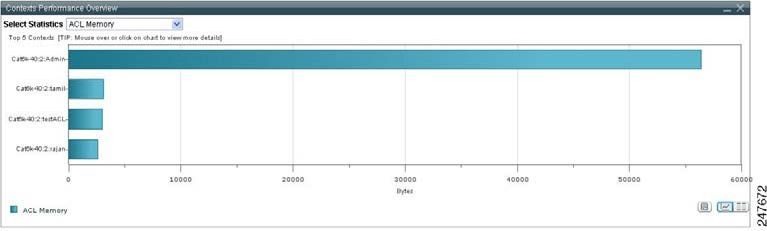
The
Contexts

Per

formance

Overview

gr

aph

displays

the

top

five

vi

rtual

contexts

based

on
user-configurable
resource

statistic

such

as

ACL

Memory,

Bandwidth,

and

so

on.

You

select

the

resource
from
the

Select

Statistics

drop-down

list.

This

data

is

collected

by

ANM

by

using

the

ACE

show
resource
usage

CLI

command.
Figure
17-11
Context
Performance

Graph
To
toggle

the

display

of

the

top

five

virtual

context

chart

in

the

Contexts

Performance

Overview

graph:


Click
Vi
e

w


As


C

h

a

r

t


to
display
the
resource

statistic

as

a

graph.


Click
Vi
e

w


As


Gr

i

d


to
display

the

resource

statistic

as

a

numerical

line

grid.
Note
If
you

want

t

o
save
the

gr

aph

as

a

JPEG

file
for
ar

chive

or

ot

her

pur

poses,

click

t

he
Show
As

Image
button.
When

you

mouse

over

the

graph,

the

Image

Toolbar

appears.

From

t

he

Image

Toolbar,

you

can
save
the

graph

as

a

JPEG

or

send

it

in

an

email.

You

can

also

print

the

graph

if

desired.
If
you

want

to

export

object

data

to

Microsoft

Excel

for

archive

or

other

purposes,

click

the

Export

to
Excel
link

in

the

View

As

Grid

object

display.