17-16
User
Guide
for
the
Cisco
Application
Networking
Manager
5.2
OL-26572-01
Chapte
r
17
Monitoring
Your
Network
Using
Dashboards
to
Monitor
Devices
and
Virtual
Contexts
Hyperlinks
allow
you
to
access
the
corresponding
monitoring
screens
for
more
details:
•
Monitoring
Load
Balancing
on
Virtual
Servers,
page
17-33
•
Monitoring
Load
Balancing
on
Real
Servers,
page
17-37
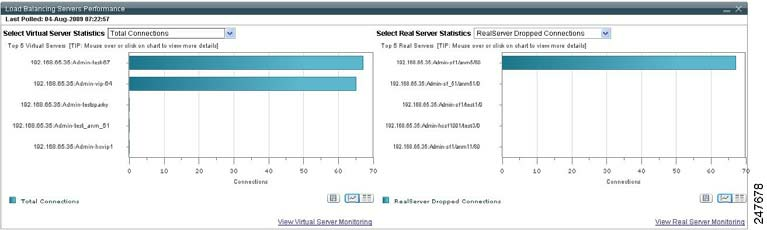
Figure
17-6
Load
Balancing
Servers
Performance
Graphs
ANM
Group
Dashboard
The
ANM
Group
Dashboard
displays
overall
information
of
the
ANM
server.
You
can
specify
to
view
details
for
the
ANM-created
All
Devices
Group
and
for
a
user-defined
ANM
device
group
(see
the
“Monitoring
Device
Groups”
section
on
pa
ge
17-23
).
You
access
the
ANM
Group
Dashboard
by
choosing
Monitor
>
Devices
>
Groups
>
All
Devices
>
Dashboard
.
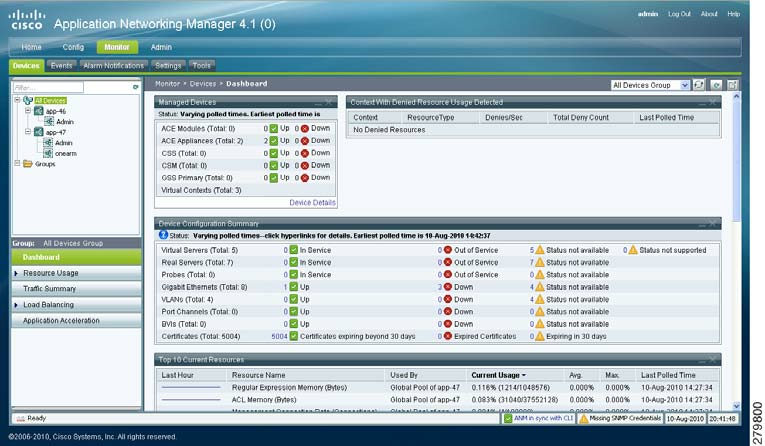
Figure
17-7
illustrates
the
individual
components
of
the
ANM
Group
Dashboard.
Note
The
ANM
software
version
that
displays
across
the
top
of
the
window
varies
depending
on
your
version
of
ANM.
Figure
17-7
ANM
Group
Dashboard