17-10
User
Guide

for

the

Cisco

Application

Networking

Manager

5.2
OL-26572-01
Chapter
17


Monitoring

Your

Network
Using
Dashboards

to

Monitor

Devices

and

Virtual

Contexts
Hyperlinks
allow

you

to

access

the

individual

resource

usage

page

for

more

details

(see

the

“Monitoring
Resource
Usage”

section

on

page

17-26 ).
Note
ACL
Memory

(for

ACE

module

and

ACE

appliance)

and

Application

Acceleration

(for

ACE

appliance
only)
do

not

appear

in

the

Device

Resource

Usage

graph.

To

view

the

detailed

counters,

click

the
hyperlink
to

access

individual

resource

usage

page.
Top
10

Current

Resources

Table
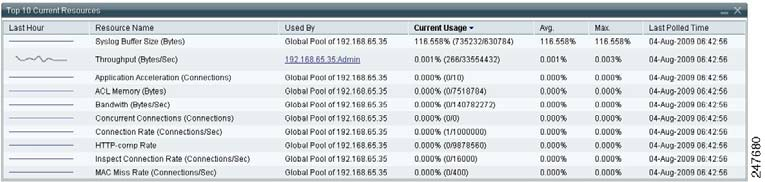
The
Top

10

Re

source

Usage

table

(Figure

17-3 )

displays

the

Top

10

resource

types

that

have

been
evaluated
for

high

resource

utilization.

The

resource

with

highest

utilization

appears

at

the

top.

This

data
is
collected

by

ANM

by

using

the

ACE

show

resource

usage

CLI

command.
Figure
17-3
Top
10

Current

Resources

Table—ACE

Dashboard
This
table

includes

the

following

information:


Last
Hour—Plot

of

high
resource
utilization

during

the

past

hour.


Resource
Name—Type

of

syst

em

resource

i

n
the
context.


Used
By—Name

of

the

virtual

context

that
is
placing

the

high

demands

on

the

resource.
The

Global
Pool
usage

is

critical

in

the

setup

where

one

or

more

contexts

are

configured

to

make

use

of

the
global
pool

once

their

reserved

resource

are

depleted

and

resource

is

free

in

the

global

pool.

In

this
situation,
if

the

global

pool

is

depleted,

multiple

contexts

may

be

starved

for

resource.
Note
Contexts
configured

to

make

use

of

the

global

pool

will

not

be

evaluated
for
the
Top
10
Resource
Usage
t

able.


Current
Usage—Active

concurrent

instances

or

the

current
rate
of
the
resource.


Average—Average
value

of

resource

usage

(based

on

th

e

l

ast

hou

r).


Max.—Highest
value

of
resource
usage

(based
on
the

last

hour).


Last
Polled
Time—Date
and

time

of

the

last

time

that

ANM

polled
the
device

to

display

the

current
va
l

u

es

.
Hyperlinks
allow

you

to

access

the

individual

resource

usage

page

for

more

details

(see

the

“Monitoring
Resource
Usage”

section

on

page

17-26 ).
You
can

choose

to

show

or


hide

t

he

sysl

og

buffer

information

t

hat

di

splays

in

the

Top

10

Cur

rent
Resources
pane.

You

may

want

to

hide

this

information

because

it

will

always

show

100

percent

after
the
buffer

becomes

full

and

starts

to

wrap.

For

more

information,

see

the

“Managing

the

Syslog

Buffer
Display
in

the

All

Devices

Dashboard”

section

on

page

18-66 .