11-5
User
Guide
for
the
Cisco
Application
Networking
Manager
5.2
OL-26572-01
Chapte
r
11
Configuring
SS
L
Using
SSL
Certificates
For
more
information
on
SSL
configuration
features,
see
the
“Summary
of
SSL
Configuration
Tasks”
section
on
page
11-3
.
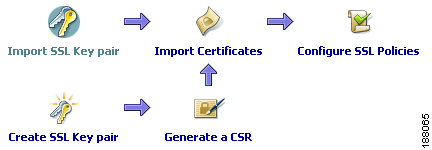
Figure
11-2
SSL
Setup
Sequence
Related
Topics
•
Configuring
SSL,
page
11-1
•
Importing
SSL
Certificates,
page
11-7
•
Importing
SSL
Key
Pairs,
page
11-11
•
Configuring
SSL
Parameter
Maps,
page
11-18
•
Configuring
SSL
Chain
Group
Parameters,
page
11-23
•
Configuring
SSL
Proxy
Service,
page
11-27
Using
SSL
Certificates
Digital
certificates
and
key
pairs
are
a
form
of
digital
identification
for
user
authentication.
Certificate
Authorities
issue
certificates
that
attest
to
the
validity
of
the
public
keys
they
contain.
A
client
or
server
certificate
includes
the
following
identification
attributes:
•
Name
of
the
Certificate
Authority
and
Certificate
Authority
digital
signature
•
Name
of
the
client
or
server
(the
certificate
subject)
that
the
certificate
authenticates
•
Issuer
•
Time
stamps
that
indicate
the
certificate’s
start
date
•
Time
stamps
that
indicate
the
certificate’s
expiration
date
•
CA
certificate
A
Certificate
Authority
has
one
or
more
signing
certificates
that
it
uses
for
creating
SSL
certificates
and
certificate
revocation
lists
(CRLs).
Each
signing
certificate
has
a
matching
private
key
that
is
used
to
create
the
Certificate
Authority
signature.
The
Certificate
Authority
makes
the
signing
certificates
(with
the
public
key
embedded)
available
to
the
public,
enabling
anyone
to
access
and
use
the
signing
certificates
to
verify
that
an
SSL
certificate
or
CRL
was
actually
signed
by
a
specific
Certificate
Authority.
Note
For
the
ACE
module
A2(3.0),
ACE
appliance
A4(1.0),
or
later
releases
of
either
device
type,
the
ACE
supports
a
maximum
of
eight
CRLs
for
any
context.
For
earlier
releases
of
either
device
type,
the
ACE
supports
a
maximum
of
four
CRLs
for
any
context.