8-10
User
Guide
for
the
Cisco
Application
Networking
Manager
5.2
OL-26572-01
Chapte
r
8
Configuring
Real
Servers
and
Server
Farms
Managing
Real
Servers
•
Modifying
Real
Server
Weight
Value,
page
8-17
•
Displaying
Real
Servers,
page
8-18
•
Using
the
Real
Ser
ver
Connection
Statistics
Graph,
page
8-22
•
Using
the
Real
Ser
ver
Topology
Map,
page
8-23
•
CLI
Commands
Sent
from
the
Real
Server
Table,
page
8-23
•
Server
Weight
Ranges,
page
8-25
Managing
Real
Server
Groups
This
section
describes
how
to
organize
real
servers
into
groups,
which
allows
you
to
display
and
manage
a
specific
group
of
real
servers
without
having
to
filter
the
real
server
display.
When
creating
a
group,
you
specify
whether
the
group
is
available
to
just
you
or
is
available
globally
to
all
ANM
users.
The
real
server
group
feature
is
available
fr
om
t
he
real
servers
operations
window
(Config
>
Operations
>
Real
Servers),
which
contains
the
Groups
option
for
managing
object
groups.
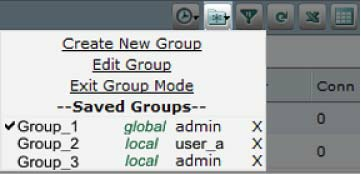
Figure
8-1
shows
the
Groups
icon
with
the
following
available
options
for
managing
object
gr
oups:
•
Create
New
Group—Adds
a
new
group.
•
Edit
Group—Modifies
an
existing
group.
This
option
di
splays
onl
y
after
you
sel
ect
a
group
to
display
in
Group
mode.
•
Exit
Group
Mode—Changes
the
di
splay
from
the
specific
gr
oup
display
t
o
the
di
splay
of
al
l
real
servers.
This
option
di
splays
onl
y
af
ter
you
sel
ect
a
gr
oup
and
t
he
display
enters
the
Group
mode.
•
Saved
Groups—Lists
the
currently
configured
groups
with
each
group’s
privilege
level
(local
or
global)
and
owner.
From
this
vi
ew,
you
can
choose
a
group
to
di
splay
or
de
lete
a
group.
Figure
8-1
Object
Grouping
for
Real
Servers
Guidelines
and
Restrictions
This
topic
includes
the
following
guidelines
and
restrictions:
•
When
you
create
a
global
group,
other
users
can
see
the
group
if
they
have
access
to
at
least
one
object
within
the
group.
This
rule
does
not
apply
to
the
admin
user
or
a
use
r
with
the
anm-admin
role
because
they
have
visibility
to
all
global
groups.
•
To
edit
or
delete
a
group,
you
must
be
the
group
owner,
a
user
with
the
anm-admin
role,
or
the
admin
user.