7-76
User
Guide

for

the

Cisco

Application

Networking

Manager

5.2
OL-26572-01
Chapter
7


Configuring

Virtual

Servers
Managing
Virtual

Servers


Click
Cancel
to

cancel

the

Activation

or

Suspension

operation.
Related
Topics


Managing
GSS
VIP

Answer

and

DNS

Rule
Groups,
page
7-76


Information
About

Load

Balancing,

page
7-1


Managing
GSS

VIP

Answers,

page
7-73
Managing
GSS

VIP

Answer

and

DNS

Rule

Groups
This
section

describes

how

to

organize

GSS

VIP

answers

or

DNS

rules

into

groups,

which

allows

you

to
display
and

manage

a

specific

group

of

VIP

answers

or

DNS

rules

without

having

to

filter

the

display.
When
creating

a

group,

you

specify

whether

the

group

is

available

to

just

you

or

is

available

globally

to
all
ANM

users.
The
GSS

object

grouping

feature

is

available

from

the

following

operations

windows:


Answer
VIPs

(Config
>
Operations
>
GSS
VIP
Answers)


DNS
Rules

(Config
>
Operations
>
GSS
DNS
Rules)
These
windows

contain

t

he

Groups

opt

ion

for

managing

object

groups.

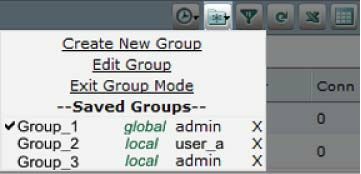
Figure

7-2

shows

the

Groups
icon
with

the

following

available

opt

ions

for

managing

object

groups:


Create
New

Group—Adds

a

new

group.


Edit
Group—Modifies

an

existing

group.

This
option
di

splays

onl

y

after
you
sel

ect

a

group

to
display
in

Group

mode.


Exit
Group

Mode—Changes

the

display

from

the

Group

mode

display

to

the

display

of

all

VIP
answers
or

DNS

rules.

This

option

displays

only

after

you

select

a

group

and

the

display

enters

the
Group
mode.


Saved
Groups—Lists

the

currently

configured

groups

with

each

group’s

privilege

level
(local
or
global)
and

owner.

From

this

vi

ew,

you

can

choose

a

group

to

di

splay

or

de

lete

a

group.
Figure
7-2
Object
Grouping

for

GSS

VIP

Answers

and

DNS

Rules
Guidelines
and

Restrictions
Object
grouping

guidelines

and

restrictions

are

as

follows:


When
you
create
a
global

group,

other

users

can

see

the

group

if

they

have
access
to
at

least

one
object
within

the

group.

This

rule

does

not


apply

to

the

admin

user

or

a

use

r

with

the

anm-admin
role
because

they

have

visibility

to

all

global

groups.