3-15
User
Guide

for

the

Cisco

Application

Networking

Manager

5.2
OL-26572-01
Chapter
3


Using

ANM

Guided

Setup
Using
Application

Setup


Non-template
options—Choose

one

of

the

following

application

types

if

you

do

not

want

to

create
an
application

that

is

not

based

on

a

system

or

user-defined

template:


Generic-SSL-HTTP—Choose

this

application

type

if

your

ACE

is

to

use

HTTPS

when
communicating
with

either

the

client

or

with

real

servers.


Generic-Non-SSL—Choose

this

application

type

if

your

ACE

is

t

o

use

HTTP

when
communicating
with

either

the

client

or

with

real

servers.
These
applications

allow

you

to

create

an

application

that

is

more

granular

in

terms

of

the

number
of
attributes

that

you

can

configure

using

Guided

Setup

compared

to

an

application

based

on

a
system
or

user

template.


Template-based
options—Choose

one

of
the
application
types

that

are

based

on

a

system

template
provided
with

ANM

or

a

user-defined

template.

Examples

of

system

templates

include

the
following:


Microsoft

Exchange


Microsoft

SharePoint
For
more

informtion,

see

Guidelines

and

Restrictions .”
Step
3
From
the

Select

Virtual

Context

drop-down
list,
choose

an
existing
ACE

virtual

context.
Step
4
Choose
the

network

topology

that

reflects

the

relationship

of

the

selected

ACE

virtual

context

to

the

real
servers
in

the

network.
Topology
choices

include

one-armed,

routed,

or

br

idged.

See

t

he

“ACE

Network

Topology

Overview”
section
on

page

3-12

for

background

details

on

ne

tworking

topology.
Step
5
Click
Start
Setup.
Step
6
Configure
the

attributes

that

are

associated

with

the

selected

application

type

and
topology

and

listed
under
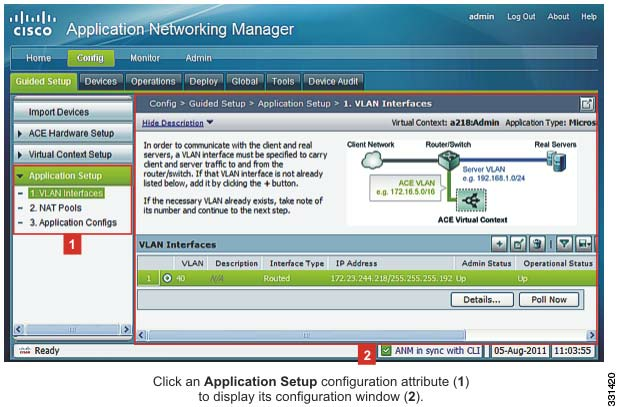
Application

Setup

(see

Figure

3-5 )

and

described

in

Ta

b

l

e


3-2 ,

which

includes

all

possible
attributes.
Figure
3-5
Navigating
Application

Setup

Configuration

Attributes