3-14
User
Guide
for
the
Cisco
Application
Networking
Manager
5.2
OL-26572-01
Chapte
r
3
Using
ANM
Guided
Setup
Using
Application
Setup
Using
Application
Setup
You
use
the
Application
Setup
task
to
set
up
load
balancing
for
an
application
in
which
you
choose
an
application
t
ype,
vi
rtual
context
to
configure,
and
network
topology
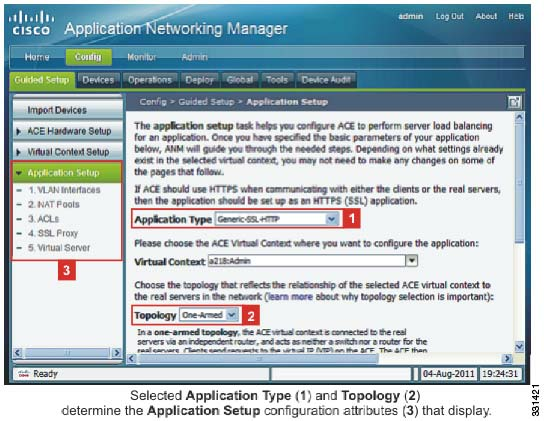
(see
Figure
3-4
).
ANM
Gu
ided
Setup
displays
a
list
of
configuration
attributes
to
define
that
is
based
on
your
choice
of
application
type
and
network
t
opology.
Figure
3-4
Guided
Setup:
Application
Setup
Guidelines
and
Restrictions
The
Application
Type
drop
down
list
(see
Figure
3-4
)
includes
both
non-template
and
template-based
options.
The
template-based
options
are
application
definition
templates
that
allow
you
to
quickly
configure
one
or
mo
re
ACE
vi
rtual
contexts
(or
devices)
with
a
co
mplex
configuration
for
well
known
or
custom
in-house
applications.
A
template
can
be
a
Ci
sco-defined
syst
em
template
or
it
can
be
user-defined.
The
number
of
system
templates
that
display
in
the
drop-down
list
increases
as
more
of
these
templates
become
available
during
ANM
upgrades
or
you
import
them
into
ANM
from
the
Cisco
Developers
Network.
For
more
information,
see
the
“Information
About
Application
Template
Definitions
and
Instances”
section
on
pa
ge
4-1
.
By
default,
all
system
templates
display
in
the
Application
Type
drop
down
list.
You
can
edit
a
template
so
that
it
does
not
display
in
this
list.
For
more
information,
see
the
“Editing
an
Application
Template
Definition”
section
on
page
4-15
.
Procedure
Step
1
Choose
Config
>
Guided
Setup
>
Application
Setup
.
The
Application
Setup
window
appears.
Step
2
From
the
Application
Type
drop-down
list,
choose
an
application
as
follows: