2-2
User
Guide
for
the
Cisco
Application
Networking
Manager
5.2
OL-26572-01
Chapte
r
2
Using
Homepage
Information
About
Homepage
•
Configuration—Tasks
that
al
low
you
t
o
configure
system
attributes
for
a
vi
rtual
context,
control
a
user’s
access
to
ANM,
and
display
configuration
and
deployment
changes
logged
in
the
ANM
database.
•
Documentation—Quick
links
to
ANM,
ACE
module,
and
ACE
appliance
user
documentation
on
www.cisco.com.
•
System
Summary—Tasks
that
allow
you
to
display
critical
alarm
notifications
when
the
value
for
a
specific
statistic
rises
above
the
specified
setting
or
display
all
critical
events
received
from
an
ACE
device
for
syslog
and
SNMP
traps
from
all
virtual
contexts.
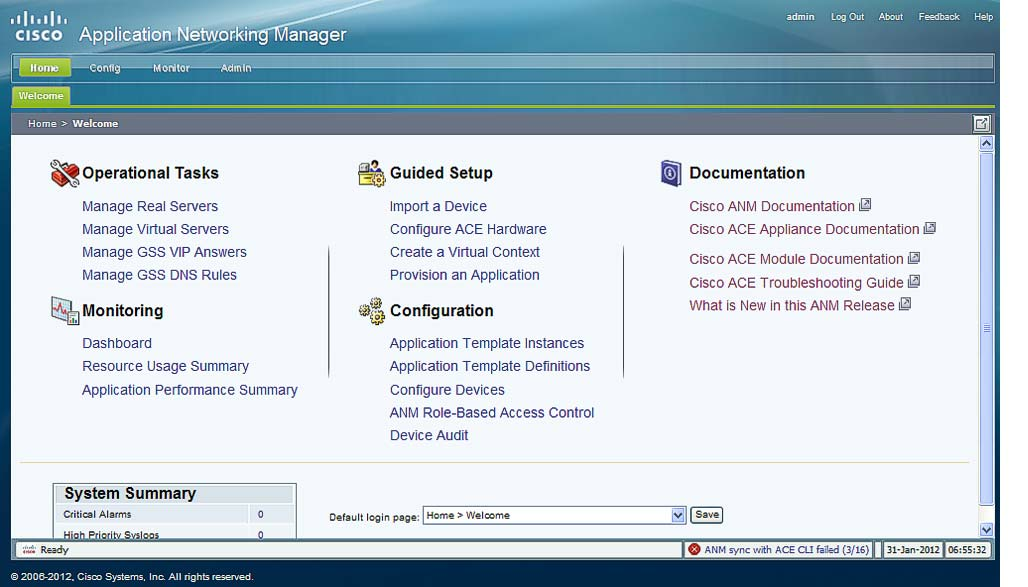
By
default,
the
ANM
Homepage
(see
Figure
2-1
)
is
the
first
page
that
appears
in
ANM
after
you
log
in.
To
access
t
he
Homepage
from
ot
her
locations
within
ANM,
cl
ick
the
Home
menu
option
at
the
top
of
the
window.
From
the
Homepage,
you
can
customize
which
page
you
want
to
di
splay
for
subsequent
logins
into
ANM.
See
the
“Customizing
the
Default
ANM
Page”
section
on
page
2-4
for
details.
Note
All
menu
options
on
the
Homepage
are
under
Role-Based
Access
Control
(RBAC).
Menu
options
will
be
grayed
if
proper
permission
has
not
been
granted
to
the
logged
in
user
by
the
administrator.
See
the
“How
ANM
Handles
Role-Based
Access
Control”
section
on
page
18-8
for
more
information
about
RBAC
in
ANM.
Note
The
ANM
software
version
that
displays
across
the
top
of
the
window
varies
depending
on
your
version
of
ANM.
Figure
2-1
Homepage
Window