1-8
User
Guide
for
the
Cisco
Application
Networking
Manager
5.2
OL-26572-01
Chapte
r
1
Overview
ANM
Interface
Components
ANM
Interface
Components
This
section
includes
the
following
topics:
•
ANM
Windows
and
Menus,
page
1-9
•
ANM
Buttons,
page
1-11
•
Table
Conventions,
page
1-14
•
ANM
Screen
Conventions,
page
1-17
When
you
log
in
to
ANM,
the
default
window
that
appears
is
the
Homepage
from
which
you
can
access
the
operational
and
monitoring
features
of
ANM.
For
details
about
using
Homepage,
see
the
“Information
About
Homepage”
section
on
page
2-1
).
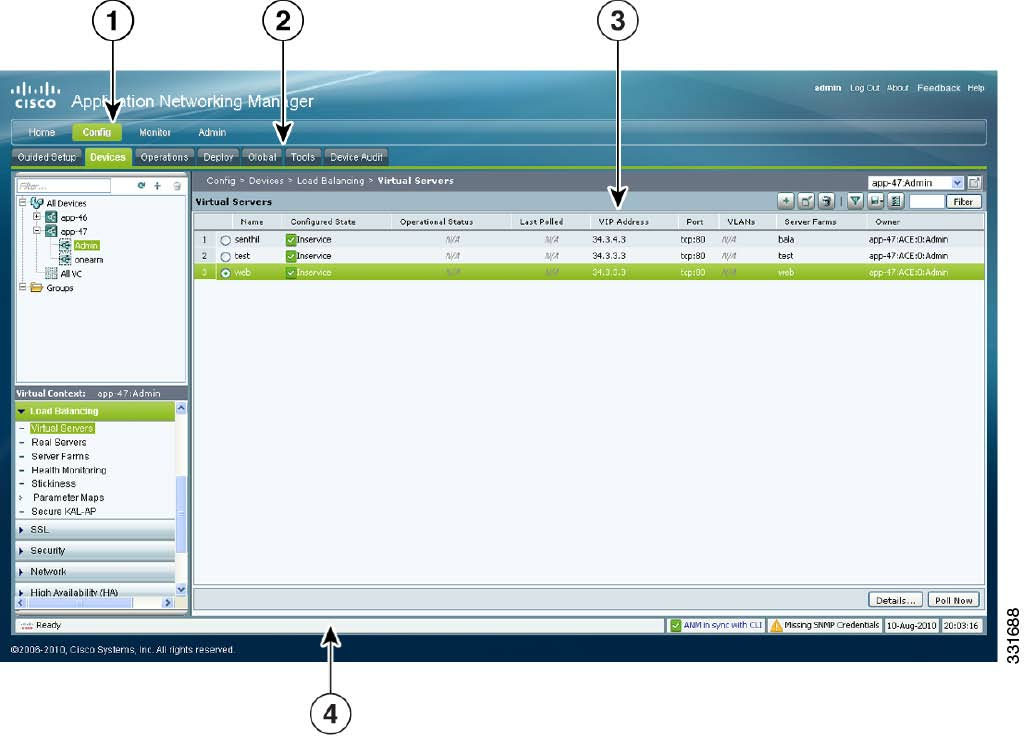
Figure
1-2
shows
the
Devices
window
(Config
>
Devices),
which
i
s
an
example
ANM
work
window
where
you
view
the
network
device
tree
and
perform
network
management
tasks.
Ta
b
l
e
1-1
describes
the
numbered
fields.
Note
The
ANM
software
version
that
displays
across
the
top
of
the
window
varies
depending
on
your
version
of
ANM.
Figure
1-2
ANM
Interface
Components